

Engineering
Claude Code Proxy: How to Route Claude Code Through Nautili
Learn how to route Claude Code through a proxy gateway with Nautili: the two setups, what each tracks or enforces, and a rollout plan for your engineering team.

TL;DR
- A Claude Code proxy is a gateway between Claude Code and Anthropic, so every request passes through one place your team controls, and Nautili is an LLM gateway that plays that role. The
ANTHROPIC_BASE_URLvariable is what points Claude Code at it. - Setup 1 sets only the base URL and leaves each developer on their own Claude subscription or key, which needs a self-hosted or Hosted Gateway because the Shared Gateway refuses subscription tokens. You get telemetry, sessions, and per-developer attribution on a Claude login, with no budgets or rate limits. On a plain
ANTHROPIC_API_KEYthe developer is blank unless the request carries anX-Dz-Userheader, which Claude Code can send throughANTHROPIC_CUSTOM_HEADERS. - Setup 2 uses a Nautili-issued key (
sk-dz-) asANTHROPIC_API_KEY, backed by your own provider key (BYOK) or a managed one, and it works on the Shared Gateway. Budgets, model allowlists, and rate limits all apply. - A rollout for thirty engineers works in three phases: the base URL for everyone first, then keys for the eight engineers on shared API keys, then budgets and rate limits with CI keys.
- A router that sends Claude Code to non-Claude models is not supported by Anthropic, so "Claude Code router" in practice means one gateway that tracks and controls Anthropic traffic.
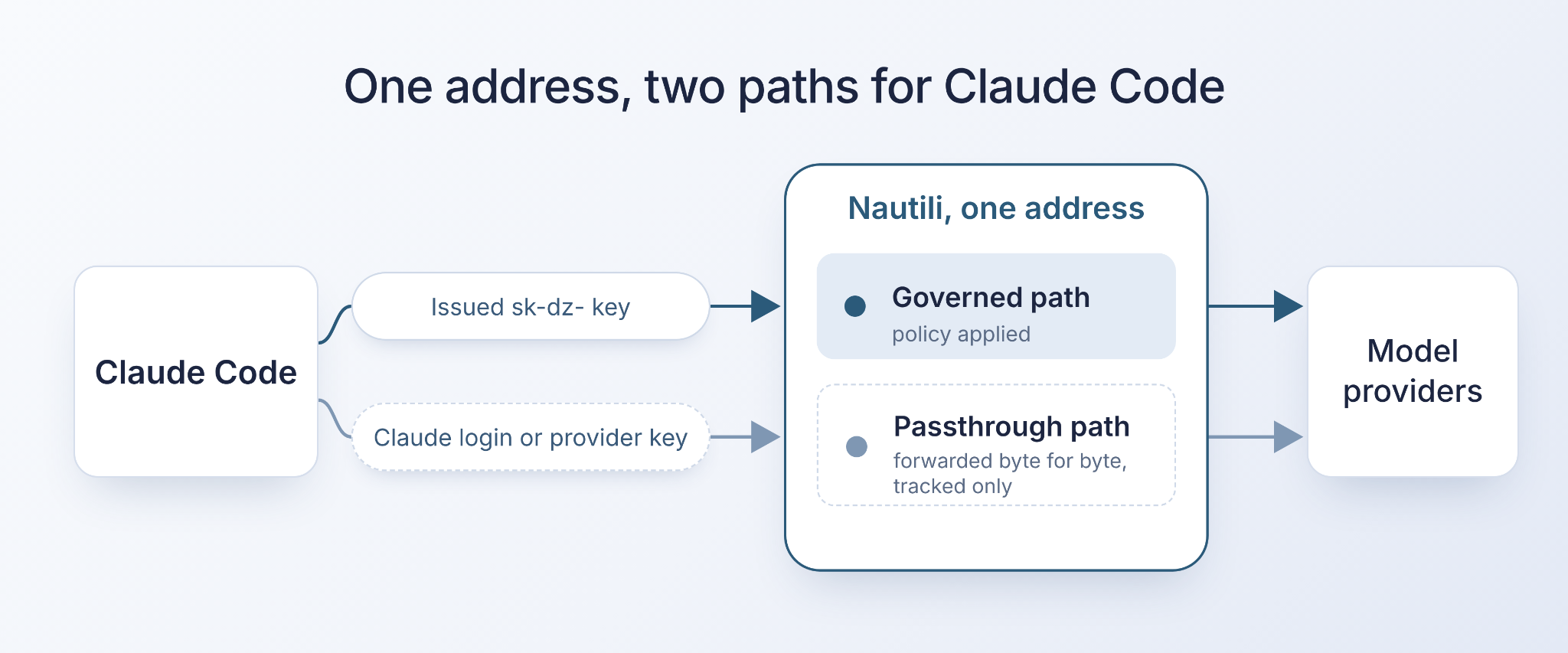
Suppose we have a company with thirty engineers using Claude Code every day: twenty on personal subscriptions, eight sharing two team API keys, and two contractors on their own keys. When finance asks which team spent what last month, the answer sits in a dozen separate places. A proxy puts every request in one log, and the sections below show how much control you can add on top.
What is a Claude Code Proxy
Claude Code is Anthropic's coding agent that runs in your terminal and editor. By default, it sends each request straight to Anthropic, using the developer's login or API key.
A proxy is a server in the middle: it receives the request, forwards it to Anthropic, and returns the response. ANTHROPIC_BASE_URL is the environment variable that tells Claude Code which address to send requests to, and changing it is all the client needs to do.
A gateway is a proxy with a control layer. Anthropic describes what a gateway gives an organization as five things in one place:
- Credentials: the provider key stays server-side while developers hold gateway credentials.
- Usage tracking: usage is attributed by developer or team.
- Cost controls: budgets and rate limits are enforced centrally.
- Audit logging: every model request can be logged.
- Provider switching: the upstream changes in gateway configuration without touching developer machines.
Claude Code Router vs Proxy vs Gateway Compared
These three words get used for overlapping things. A proxy forwards traffic, a router chooses which model or provider serves a request, and a gateway combines both with tracking and policy.
People who search for a Claude Code router or a Claude Code OpenRouter setup usually want one of two things: a way to see and control what Claude Code spends, or a way to pick models per request.
OpenRouter's guide for Claude Code sets the base URL to its own API, puts the OpenRouter key in ANTHROPIC_AUTH_TOKEN and leaves ANTHROPIC_API_KEY empty, and it notes that Claude Code only works reliably with the Anthropic first-party provider. Anthropic also states that it doesn't support routing Claude Code to non-Claude models through any gateway, so plan on Claude models behind any setup in this post.
If you are weighing a hosted router against a gateway you run yourself, the Nautili vs OpenRouter comparison lays out the differences.
Six Ways to Route Claude Code Through a Proxy
Each option changes what Claude Code sends, who pays the provider and what you can enforce. The table covers the six you are most likely to meet.
| Option | What Claude Code sends | Who pays the provider | What you can enforce |
|---|---|---|---|
| 1. Base URL only | What Claude Code sendsThe developer's own Claude login or key | Who pays the providerWhoever owns that subscription or key | What you can enforceNothing, tracking only |
| 2. Issued key, BYOK | What Claude Code sendsAn sk-dz- key as ANTHROPIC_API_KEY | Who pays the providerYou, directly on your own Anthropic key | What you can enforceBudgets, model allowlists, rate limits |
| 3. Issued key, managed | What Claude Code sendsThe same sk-dz- key | Who pays the providerBilled through Nautili's OpenRouter credential by default, or an Anthropic Console key an admin assigns | What you can enforceBudgets, model allowlists, rate limits |
| 4. apiKeyHelper | What Claude Code sendsA key fetched by a command, sent in both auth headers | Who pays the providerWhoever owns the fetched key | What you can enforceWhat that key's setup allows |
| 5. Corporate network proxy only | What Claude Code sendsUnchanged | Who pays the providerUnchanged | What you can enforceNetwork egress rules, not model or spend policy |
| 6. Hosted router such as OpenRouter | What Claude Code sendsThe router's key as ANTHROPIC_AUTH_TOKEN | Who pays the providerThe router's credits | What you can enforceThe router's own controls |
Options 1 to 3 are the Nautili setups this post covers, option 4 is an add-on to either issued key setup, and options 5 and 6 are what teams often have already.
Setup 1: Point Claude Code at Nautili With Only a Base URL
Setup 1 needs a gateway you install, because the Shared Gateway serves issued-key traffic only and refuses subscription tokens. In the install flow, choose Self-hosted with Helm or Docker Compose, or a Hosted Gateway, where Nautili runs and manages a dedicated gateway for your team.
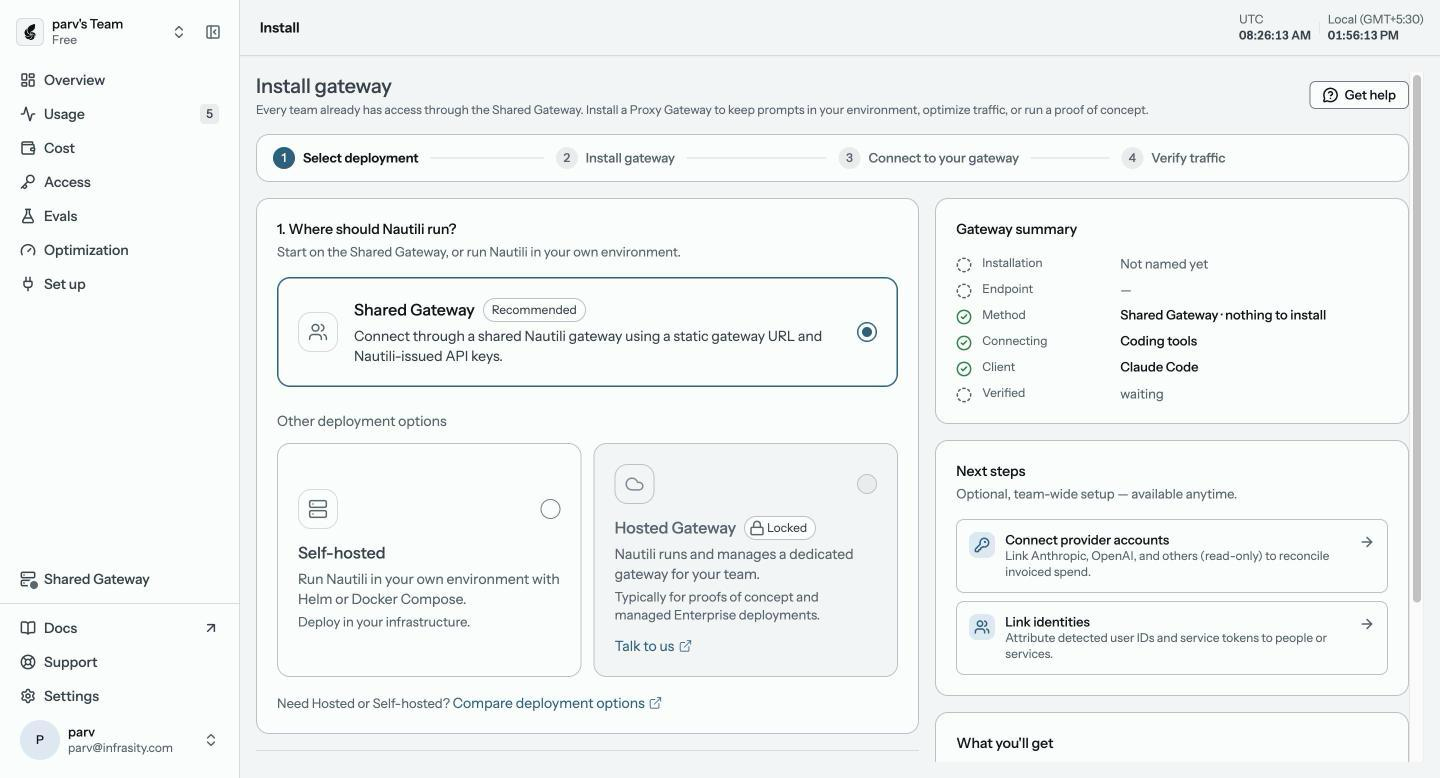
Then give each developer the address of the gateway's Anthropic listener and have them export it:
The connect snippet in the Nautili dashboard comes pre-filled with your address. On the Shared Gateway, the Anthropic listener shares the one base host and /v1/messages is routed to it by path. On a Proxy Gateway behind an ingress, it is served at anthropic-<your-host>, and without one it is the gateway service on port 8081, for example http://localhost:8081 on a local Docker install.
Leave ANTHROPIC_API_KEY as it is, because the developer stays signed in with their own Claude account. The gateway forwards the subscription token as-is and records the request, stripping the X-Dz-* headers before the provider and adding anthropic-version when it is missing. A shell export lasts for one terminal session, so for a permanent setup, put the same value in the env block of ~/.claude/settings.json, which also reaches background agents.
Because the subscription login stays active, the subscription's usage limits and billing still apply. Budgets, rate limits and routing profiles apply only to issued keys, and a model allowlist reaches this traffic only through a seat guardrail. Nautili records what passed through:
- Token counts, cost, latency, and cache outcomes for every request.
- Sessions, rebuilt automatically. Claude Code does not send the
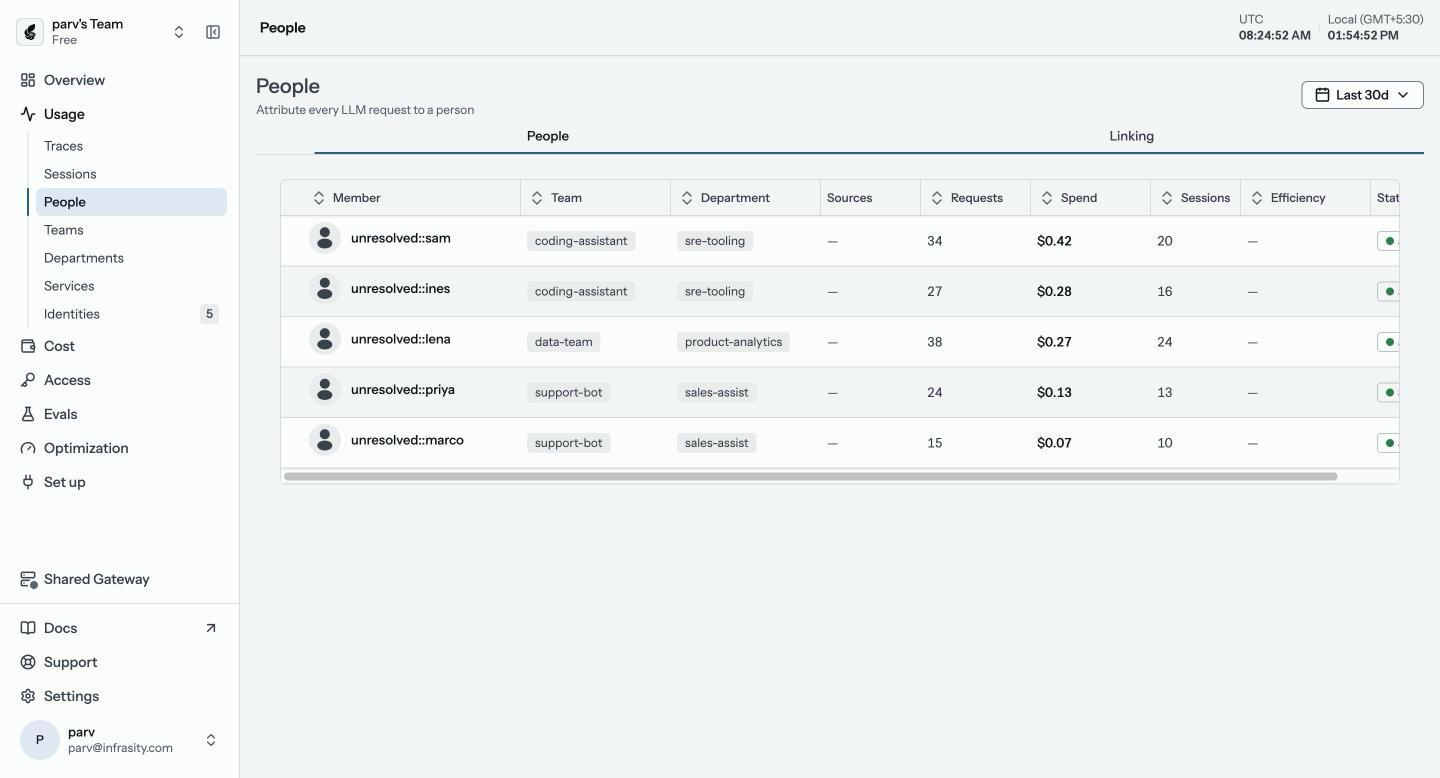
X-Dz-Session-Idheader, so on the Anthropic surface the gateway uses Claude Code's own session ID instead. - Per-developer attribution on a Claude login: the gateway reads the Claude account ID from the request metadata and looks up the account profile, pulls the account's email and name, and auto-links it to the team member with that email. People > Linking is needed only when the emails differ or the person is not in the workspace yet. On a plain
ANTHROPIC_API_KEYthe developer is blank unless the request carries anX-Dz-Userheader, which Claude Code can send throughANTHROPIC_CUSTOM_HEADERS.
On a subscription seat, no bill changes with each request, so Nautili measures value as rate-limit headroom, which the dashboard shows as seat utilization, rather than dollars. Any dollar figure on this traffic is an estimate at API prices and is labeled as one. This setup tracks usage and does not cap it.
The X-Dz-* attribution headers are read on every request, including base-URL-only traffic, so Setup 1 can tag project and environment through ANTHROPIC_CUSTOM_HEADERS with the same env block shown in the headers example later in this guide.
Setup 2: Use a Nautili Issued Key as ANTHROPIC_API_KEY
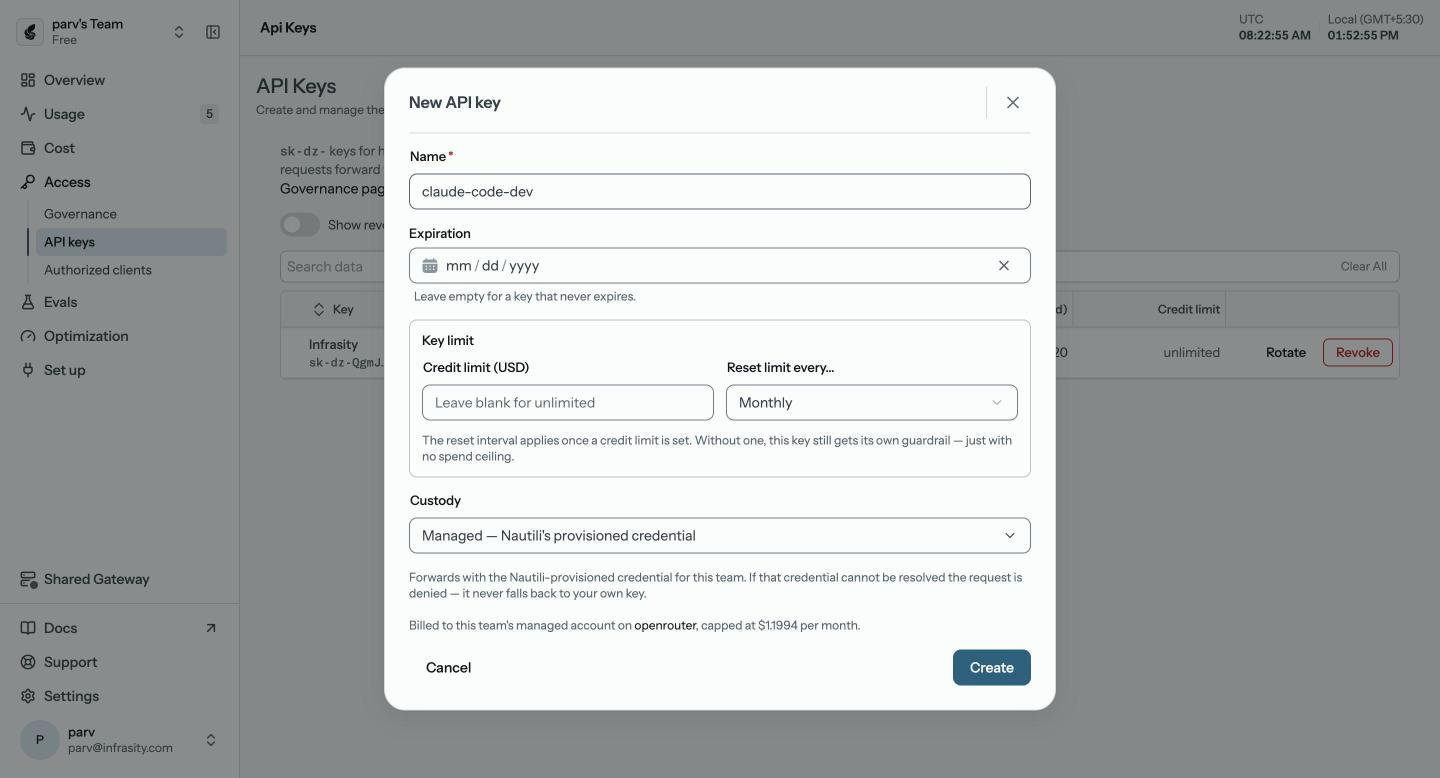
An issued key is a credential Nautili creates for you, in the format sk-dz- followed by 43 characters. Create one in the dashboard and copy it straight away, because the full key is shown only once and stored hashed. You choose who pays the provider when you issue it:
- BYOK: your own Anthropic key, stored in Nautili under Provider keys. Nautili forwards requests with it, and the provider bills you directly.
- Managed: Nautili holds the provider credential for the team. There is no self-serve managed Anthropic key: by default managed traffic uses Nautili's OpenRouter credential on its Anthropic path, or an Anthropic Console key that an admin assigns.
For Claude Code on your own Anthropic key, BYOK is the path to lead with. The New API key dialog, shown below, is where you set the key's name, expiration, credit limit (USD) with its reset (never, daily, weekly or monthly), and custody, either Managed or BYOK.
A BYOK key is stored under Connections > Provider keys, where the Anthropic key appears once it is saved:

Then set the two variables:
Claude Code sends ANTHROPIC_API_KEY in the x-api-key header, and in an interactive session it asks once to approve the key. A key that was declined earlier is ignored without a prompt until you enable it under /config with the Use custom API key option.
While that variable is set, requests carry the gateway key instead of the claude.ai login, and the subscription's usage limits no longer apply. The saved claude.ai login stays on the machine but unused. This is the setup where policy applies. Nautili decides the path by the credential on each request: one carrying an sk-dz- key is governed, routed, and metered, while one carrying a Claude seat token is forwarded as-is, even when both arrive at the same address.
- Budgets are counted in USD per person, per service key, or on the team-default guardrail for the whole workspace, over a daily, weekly, monthly or lifetime window, with calendar windows counted in UTC; a pooled counter shares one bucket across everyone bound to that guardrail. Once accrued spend reaches the limit, the gateway refuses further requests with the
budget_exhaustedreason (HTTP 429 on OpenAI-compatible surfaces, 400 on the Anthropic surface Claude Code uses) until the window resets. - Model allowlists and rate limits come from the guardrail bound to the key. A key owned by a person follows that person's policy and is issued from the Governance page, while a key from the New API key dialog is a service key with no owner that gets its own guardrail at issuance instead of falling back to the team default.
To tag cost to a project and environment, add Nautili's attribution headers through ANTHROPIC_CUSTOM_HEADERS in your user settings file at ~/.claude/settings.json, with one Name: Value pair per line and \n between pairs in JSON:
How to Rotate Gateway Credentials With apiKeyHelper
An apiKeyHelper is a command Claude Code runs to fetch the credential, which suits keys that expire or come from a vault. It must print only the credential, because a banner printed alongside makes it fail. Set "apiKeyHelper": "~/bin/get-gateway-key.sh" in ~/.claude/settings.json. The output is cached for five minutes by default, and it is sent in both the Authorization and x-api-key headers.
What Each Setup Tracks Versus Enforces
Tracking and enforcement are different jobs, and only an issued key enables the second.
| Setup 1: base URL only (self-hosted or Hosted Gateway) | Setup 2: issued key | |
|---|---|---|
| Per-developer usage and sessions | Setup 1: base URL only (self-hosted or Hosted Gateway)Yes on a Claude login; on an API key, send X-Dz-User | Setup 2: issued keyYes |
| Cost by team, project and environment | Setup 1: base URL only (self-hosted or Hosted Gateway)Yes, with X-Dz-* headers | Setup 2: issued keyYes, with X-Dz-* headers |
| Budgets in USD | Setup 1: base URL only (self-hosted or Hosted Gateway)No | Setup 2: issued keyYes |
| Model allowlists and rate limits | Setup 1: base URL only (self-hosted or Hosted Gateway)Allowlists only via a seat guardrail, no rate limits | Setup 2: issued keyYes |
| Routing profiles and guardrails | Setup 1: base URL only (self-hosted or Hosted Gateway)No | Setup 2: issued keyYes |
| Usage limits that apply | Setup 1: base URL only (self-hosted or Hosted Gateway)The subscription's own | Setup 2: issued keyNone from the subscription; the provider bills the key |
Pick Setup 1 when you want visibility fast and cannot change how developers sign in. Pick Setup 2 when you need limits, or when spend should be billed through a key your team owns.
A Rollout Plan for Thirty Engineers in Three Phases
Back in the example company, a staged rollout avoids breaking anyone's daily workflow.
- Phase 1: base URL for everyone. Distribute
ANTHROPIC_BASE_URLthrough managed settings or a shell profile, pointed at a self-hosted or Hosted Gateway because the Shared Gateway refuses subscription tokens, and leave every login as it is. After a week or two, the usage views show who spends what and which team is heaviest. - Phase 2: keys for the shared API users. Issue keys to the eight engineers on shared keys first, with your own Anthropic key stored for BYOK, because their spend is already billed per token. Subscription users keep their login until a team has a reason to move, since a key replaces the subscription's usage limits.
- Phase 3: limits and CI. Bind a pooled monthly budget on the team-default guardrail, test it in a staging team, and then enforce it. Give the contractors a separate key with a rate limit, so offboarding revokes one credential. CI jobs can use a key through the GitHub Action's
anthropic_api_keyinput with the base URL in the workflowenvblock.
As each phase rolls out, the People page in the Nautili dashboard, shown below, lists developers with their traffic, so you can confirm who has moved over.
Verify the Connection From Claude Code
Run claude, send any prompt, then type /status. The Anthropic base URL line should show your gateway address. For Setup 2, an API key line naming ANTHROPIC_API_KEY confirms the gateway key is active, while a Login method line naming a claude.ai account with no API key line means you are still in Setup 1.
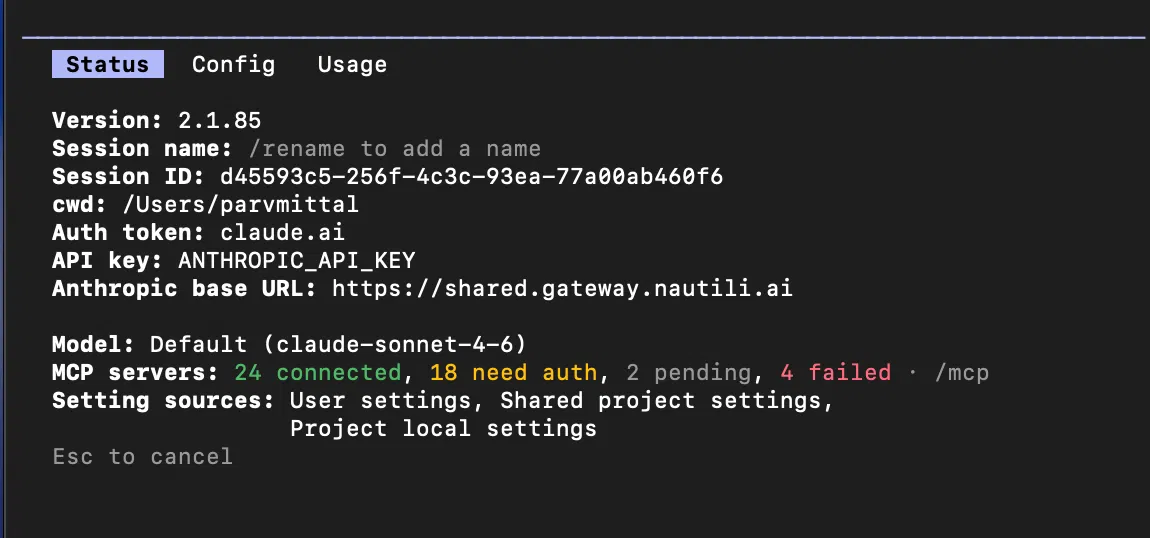
When a login and an API key are both set, the key is used and /status marks the login as not in use. If ANTHROPIC_AUTH_TOKEN and ANTHROPIC_API_KEY are both set, ANTHROPIC_AUTH_TOKEN takes priority, as Anthropic's authentication docs list.
To test the gateway before opening Claude Code, send a one-token request with the same variables. The key goes in both headers so the test works whichever one the gateway reads, and the model ID uses the author/slug format:
A JSON response starting with {"id":"msg_ means the gateway is reachable and the credential works. An error naming an unknown model still proves the address and credential are right, because the gateway authenticated the request before rejecting the model name. Then open the Nautili dashboard, where the request shows up within a few seconds.
With the current gateway build, Claude Code's native model IDs resolve against the catalog on an sk-dz- key. An older self-hosted gateway rejects them with invalid_model_id, so upgrade the gateway, or as a stopgap set ANTHROPIC_MODEL to anthropic/<slug>.
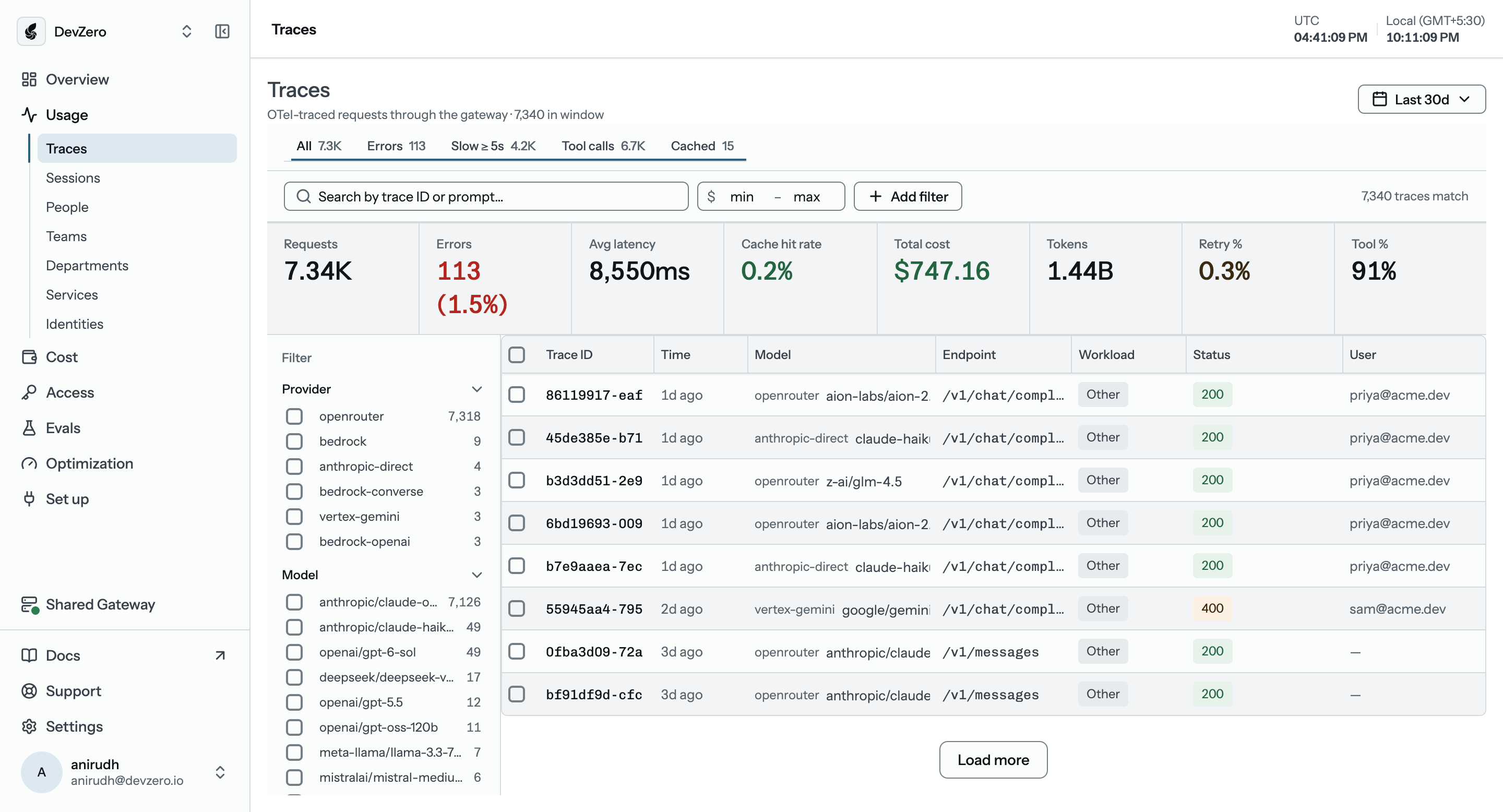
The Traces page lists every request with its latency, cost, tokens, cache outcome, and status, so the test call above should appear there as the newest row.
Fixing a Failed Claude Code Gateway Connection
Most failures come from a handful of causes. Claude Code's own troubleshooting table covers the full list, and these are the ones teams hit first:
| Symptom | Likely cause | Fix |
|---|---|---|
| 401 error | Likely causeThe credential reached the gateway in a header it does not read | FixANTHROPIC_API_KEY is sent as x-api-key and ANTHROPIC_AUTH_TOKEN as Authorization: Bearer, so try the other variable |
/status shows no Anthropic base URL line | Likely causeThe variable never reached the session | FixExport it in the same shell that launches Claude, or set it in the env block of a settings file |
| Connection refused, or a hostname that does not resolve | Likely causeNothing answers at the address, or a VPN or firewall blocks the path | FixRun the curl test above and confirm the address with your gateway team |
400 naming context_management or Extra inputs are not permitted | Likely causeThe upstream rejects fields Claude Code sends | FixSet CLAUDE_CODE_DISABLE_EXPERIMENTAL_BETAS=1 |
| 403 with an HTML body while the gateway logs show nothing | Likely causeA web application firewall blocked the request body before it arrived | FixExempt the gateway's /v1/messages path from request-body inspection |
| Certificate or TLS errors while curl succeeds | Likely causeClaude Code does not trust the same certificate authority as curl, common behind TLS-inspection proxies | FixSet NODE_EXTRA_CA_CERTS to the CA bundle path |
Keep Gateway Keys Safe on Developer Machines
An issued key is a credential, so treat it like a provider key. Keep it out of a project's committed .claude/settings.json, since everyone who clones the repository would receive it. Use ~/.claude/settings.json, or add .claude/settings.local.json to your gitignore first.
When a shell export and a settings-file env value set the same variable, the settings-file value wins in most sessions, though a session launched from the desktop app keeps the launch environment, so check /status to see which is active. With BYOK, the provider key stays on the Provider keys screen, so developers never need it locally. For a deeper walkthrough, see the Nautili coding tools guide.
Where to Start With a Claude Code Proxy
Routing Claude Code through a gateway takes one base URL and one key, and the key determines what you get back: traffic on a provider key or a login is forwarded as-is, with attribution and telemetry, while traffic on an issued key is also governed, routed, and capped.
The easiest way to begin is with one developer: create an issued key, point Claude Code at the gateway with ANTHROPIC_BASE_URL and ANTHROPIC_API_KEY, and check the result with /status. After a week, you will have real numbers on who spends what, and because every team already has a Shared Gateway, you can create that first key in the Nautili dashboard today without installing anything, though budgets need the Pay-as-you-go plan. The Claude Code integration page covers the same setup in brief.
FAQs
Does a Claude Code proxy cap spend on a personal subscription?
No. With only ANTHROPIC_BASE_URL set, the gateway tracks usage per developer on a Claude login but cannot enforce limits, because the request carries the developer's own credential, so budgets, rate limits and routing profiles need an issued key and a model allowlist applies only through a seat guardrail. On a plain ANTHROPIC_API_KEY, send an X-Dz-User header through ANTHROPIC_CUSTOM_HEADERS or the developer is blank. This setup also needs a self-hosted or Hosted Gateway, since the Shared Gateway serves issued-key traffic only and refuses subscription tokens.
What does ANTHROPIC_BASE_URL do?
It tells Claude Code which address to send its model requests to. Pointing it at a gateway sends every request through that gateway, and setting it alone does not replace the developer's subscription login.
How does ANTHROPIC_API_KEY differ from ANTHROPIC_AUTH_TOKEN?
They carry the same kind of credential in different headers: ANTHROPIC_API_KEY is sent as x-api-key and ANTHROPIC_AUTH_TOKEN as Authorization: Bearer, while apiKeyHelper sends both. When both variables are set, ANTHROPIC_AUTH_TOKEN takes priority over ANTHROPIC_API_KEY, following Anthropic's authentication precedence. If a gateway returns 401, switching to the other variable is the first thing to try.
Can I use Claude Code with OpenRouter?
Yes, through the base URL and auth token OpenRouter documents, but only with Anthropic's models and ideally the first-party provider. Nautili is the option for teams that want to run the gateway themselves and enforce budgets per person or team.
How do I check that Claude Code is using the gateway?
Run claude, send any prompt, then type /status. The Anthropic base URL line shows the gateway address, and for Setup 2 an API key line naming ANTHROPIC_API_KEY confirms the gateway key is active. A Login method line naming a claude.ai account with no API key line means the session is still on Setup 1.
Written by
Nautili team


